from pathlib import Path  # 파일 및 폴더 경로를 객체로 다루기 위해 Path 모듈 임포트

# 점검할 주요 데이터 분석 라이브러리 목록을 순회
for module in ['pandas', 'pyarrow', 'fastparquet', 'nbformat', 'matplotlib', 'seaborn', 'sklearn']:
    try:
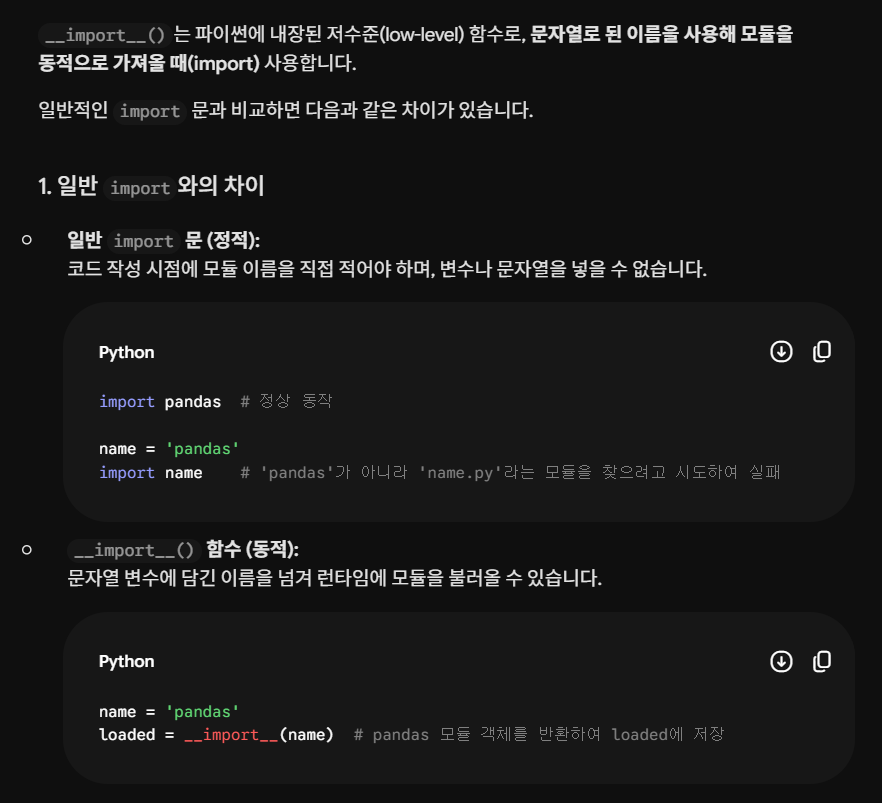
        loaded = __import__(module)  # 문자열 형태의 모듈 이름을 동적으로 임포트 시도
        print(module, getattr(loaded, '__version__', 'available'))  # 설치된 모듈명과 버전(버전 속성이 없으면 'available') 출력
    except Exception as exc:  # 임포트 실패 시 예외 처리
        print(module, 'UNAVAILABLE', type(exc).__name__, str(exc))  # 미설치 모듈명, 예외 종류, 상세 에러 메시지 출력

# 데이터가 저장된 원시 데이터 폴더 경로 객체 생성
path = Path(r'C:\Users\SONG HYOGEUN\data_project\data\raw')

# 해당 디렉터리의 모든 파일 및 하위 항목을 이름순으로 정렬하여 순회
for file in sorted(path.iterdir()):
    print(file.name, file.stat().st_size)  # 파일 이름과 파일 크기(바이트 단위) 출력

try:
    import pyarrow.parquet as pq  # Parquet 파일 처리를 위한 pyarrow.parquet 모듈 임포트

    # train과 test Parquet 파일 이름을 순회
    for name in ['train.parquet', 'test.parquet']:
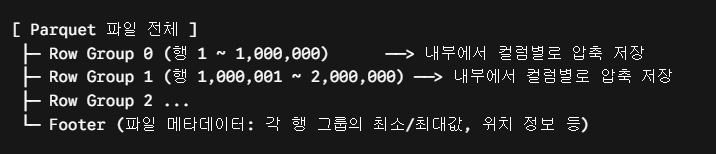
        parquet = pq.ParquetFile(path / name)  # 파일을 메모리에 다 올리지 않고 Parquet 파일 객체(메타데이터)만 로드
        print('\n', name, 'rows=', parquet.metadata.num_rows, 'row_groups=', parquet.metadata.num_row_groups)  # 파일명, 전체 행 수, 행 그룹 수 출력
        print(parquet.schema)  # 컬럼명과 각 컬럼의 데이터 타입 스키마 출력
        print('metadata=', parquet.metadata)  # Parquet 파일의 상세 메타데이터 출력
except Exception as exc:  # Parquet 파일 읽기 또는 라이브러리 임포트 실패 시 예외 처리
    print('PARQUET_METADATA_UNAVAILABLE', type(exc).__name__, str(exc))  # 실패 알림과 예외 종류, 에러 원인 출력